API Key Authentication
Overview
API Keys allow you to authenticate by including a key with each request. They are simple to use and are best suited for server-to-server integrations or quick testing.
- API keys are long-lived and do not expire automatically.
- Treat keys as secrets - they provide full access within their permissions.
How to get an API Key
- Log in to Lumin as a Workspace Owner.
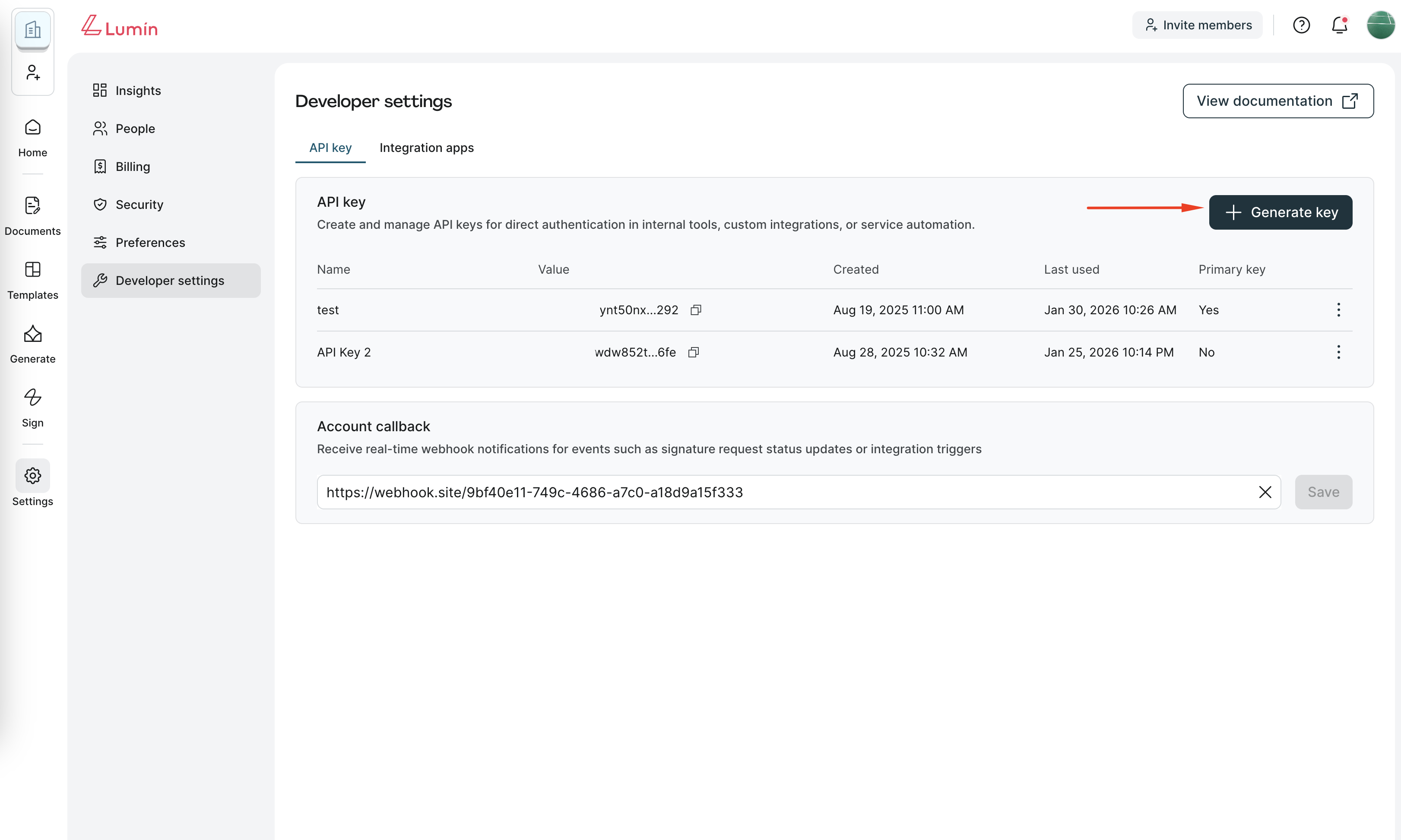
- Go to Settings → Developer settings → API keys.
- Click Generate key and input the key name.
- Copy and securely store the key.
warning
Important: API keys should be treated like passwords. Do not share them or commit them to source control.
How to use API key
You can authenticate in two ways:
1. Using X-API-KEY header
API_KEY=my_simple_api_key
curl -X GET "https://api.luminpdf.com/v1/user/info" \
    -H "X-API-KEY: ${API_KEY}"
2. Using HTTP Basic Auth
Provide your API key as the username in Basic Auth (no password required). Don't forget the trailing :.
API_KEY=my_simple_api_key
curl -X GET "https://api.luminpdf.com/v1/user/info" \
    -u "${API_KEY}:"
Multiple API keys
- Each account can have up to 4 API keys active at a time.
- All keys are valid and can be used in parallel.
- One key can be marked as the Primary Key. The Primary Key is used to generate signatures for verifying Account webhook event payloads.
Rotating API keys
- To rotate, generate a new key from the Developer settings page.
- Old keys will continue to work until you delete them.
- Always confirm the new key works before deactivating old ones.
- If you change the Primary Key, ensure your webhook signature verification logic is updated.
info
When to rotate keys:
- At least every 6 months (recommended).
- Immediately, if exposure or compromise is suspected.
Best practices
- Store keys in a secret manager (e.g., AWS Secrets Manager, HashiCorp Vault).
- Rotate keys periodically.
- Never embed keys in mobile apps or client-side code.
- Use API keys only for trusted backend integrations where OAuth 2.0 is not required.
- Always verify new keys work before deleting old ones.